Make your first API call
Get from nothing to one working request against the Assessor.io public API
(v2): a token, your account ID, the right scopes, and a curl that lists your
campaigns.
Who this is for
Developers connecting a CRM, a data warehouse, a reporting tool or an AI agent
to an Assessor.io account. You need to be able to run curl (or any HTTP
client) from a server. Everything this page touches is described in full in
Public API (v2) and the
API reference.
1. Find your account ID
Every v2 address names the account it reads, so you need the account's ID before anything else.
- Sign in to Assessor.io and open the account's dashboard.
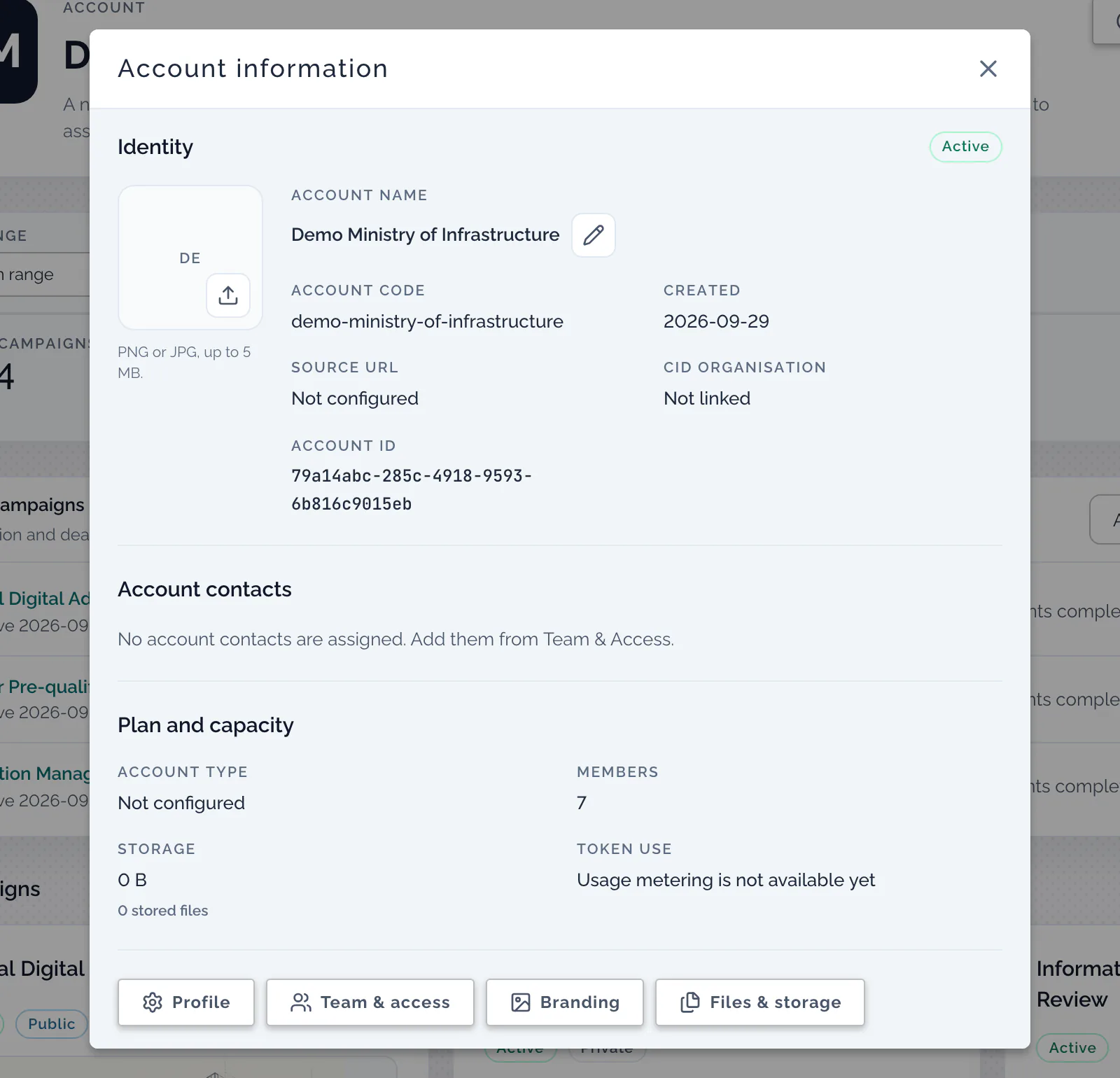
- Choose Account info. The Account information dialog opens.
- Under Identity, copy the value beside Account ID.
The Account ID is the long value at the bottom of Identity, below the account code:
The same value is the first part of the address while you are inside the
account: https://assessor.bimexcellence.org/<account ID>/dashboard.
Do not use the Account code from the same dialog. That is the account's
short name, and the API matches the ID exactly: a token granted for the ID
refuses the code with 403.
2. Choose the scopes you need
A token carries an explicit list of scopes, and each operation needs one. Scopes are never inferred from each other: a token that can read campaigns cannot read participants. Ask for the smallest set your integration uses.
| Scope | What it allows |
|---|---|
campaigns:read | Read campaigns, and a campaign's assessment inventory |
participants:read | Read a campaign's participants |
participants:write | Create and update participants |
submissions:read | Read submissions: metadata only, never answer content |
submissions:read:answers | Sensitive. Read answer content on the submissions listing, and the auditor review columns in an export |
results:export | Sensitive. Export results. An export always contains real answers |
contacts:read | Read CRM contacts |
webhooks:manage | Manage webhook subscriptions |
embed:issue | Mint embed tokens |
templates:read | Read templates, answer scales and labels |
templates:write | Compile a Blueprint into a Draft template |
statements:read | Search Action Statements and library items |
blueprints:write | Create Blueprints and run the BIMei AI Assistant over them (each run calls an AI model) |
For this page's example, campaigns:read is enough.
3. Ask for a token
Tokens are issued by the Assessor.io team, not from inside your account: the screen that creates them is open only to platform operators, and no account role can create one. Ask through the support form, and give:
- the account ID from step 1 (a token can cover more than one account);
- the scopes from step 2;
- a name that says what the token is for, so it can be recognised later.
What to expect:
- The token is shown once. Only a fingerprint of it is stored, so nobody can read it back later, including the operator who created it. Keep it in your secret store.
- It starts
asr_. Tokens issued before 17 September 2026 start differently and still work for now: see the token prefix change. - It does not expire. It stops working when it is revoked. If it is lost or exposed, ask for it to be revoked and a new one issued. Revoking takes effect on the token's next request.
- It has a request budget: 1000 requests a minute unless a different one was agreed, counted per token.
Use the token from a server only. Anyone who can read it can call the API as your integration, so never put it in a web page, a mobile app or source control.
4. Call the API
List the account's campaigns. Put your token and account ID in environment variables first, so neither ends up in your shell history:
export ASSESSOR_TOKEN='asr_…'          # the token from step 3
export ASSESSOR_ACCOUNT_ID='…'         # the Account ID from step 1

curl -sS "https://assessor.bimexcellence.org/api/v2/public/accounts/${ASSESSOR_ACCOUNT_ID}/campaigns?limit=5" \
  -H "Authorization: Bearer ${ASSESSOR_TOKEN}"
A successful answer looks like this (one campaign shown, values invented):
{
  "success": true,
  "data": [
    {
      "id": "…",
      "name": "Supplier maturity 2026",
      "status": "Active",
      "access": { "isPrivate": false, "enableRegistration": false, "enablePasscode": true },
      "lifecycles": [{ "cycle": 1, "opensAt": 1790812800000 }],
      "participantCount": 42,
      "createdAt": 1788134400000
    }
  ],
  "meta": { "page": 1, "limit": 5, "total": 1, "totalPages": 1 }
}
datais newest first.metasays how many campaigns there are in all; ask for the next page with&page=2.limitgoes up to 200 and defaults to 50.- Times are epoch milliseconds.
- A property with no value is left out, not sent as
null. Onlyid,name,status,accessandlifecyclesare always there. - To list only some campaigns, add
&status=Active(orDraftorInactive).
If it does not work
Every refusal has the same shape, { "success": false, "error": "…" }, and the
checks run in this order:
| Status | error | What to check |
|---|---|---|
401 | Unauthorized | The Authorization header is missing, misspelt, or not Bearer <token>; the token was copied incompletely; or it has been revoked |
403 | Forbidden: Account scope access denied | The account ID in the address is not one the token was granted. Check that you used the Account ID, not the Account code |
403 | Forbidden: missing required scope 'campaigns:read' | The token was issued without that scope. Ask for a token that has it |
429 | Rate limited | The token used its budget for this minute. Wait the number of seconds in the Retry-After header |
A campaign ID from another account answers 404, the same as one that does not
exist, so the API never confirms an ID outside the accounts your token covers.
Next steps
- Public API (v2): every operation, what each response leaves out on purpose, exports, and webhooks.
- API reference: the OpenAPI contract for each group of operations, with the raw files.
- MCP Server: the same token, used by an AI agent.
- Embed an assessment or its results: the browser-side path, where a website rather than a token is trusted.