Send events to your own systems with webhooks
Have Assessor.io tell another system the moment something happens in your account (a participant joins, a submission arrives, results are published) instead of that system asking over and over.
Who this is for
Account administrators who set up the connection, usually with the developer who looks after the receiving system. The sidebar entry needs the account-administration permission; of the built-in roles, Account Manager has it. What arrives at the receiving end, and how to check it is genuine, is in Public API (v2): Webhooks.
How it works
A webhook is a subscription: an address on your system (the endpoint) and a list of
events. When one of those events happens in your account, Assessor.io sends a POST
request to that address describing it. Deliveries are queued and sent on a schedule, so
they arrive shortly after the event, not instantly.
The same subscriptions can be managed through the public API; this page and the API show the same list.
Add a webhook
Sidebar People & settings › Webhooks. The page lists your subscriptions under Outbound webhooks.
- Choose Add webhook.
- Under Endpoint URL, enter the address on your system that receives the events,
for example
https://example.com/hooks/assessor. - Under Events, tick each event the endpoint should receive. The list is grouped (Participants, Submissions, Campaigns, Assessments and so on) and is every event your account can raise: an event that is not in it can never be delivered.
- Under Signing secret, enter a secret the receiving system shares, or leave it blank. With a secret, every delivery is signed with it, so the receiver can prove the request came from Assessor.io. Without one, deliveries are not signed.
- Choose Add webhook.
The page confirms with "Webhook added." The secret is never shown again, by this page or the API.
Use a secret. An unsigned endpoint accepts a request from anyone who learns its
address. Use an https address too, so the events cannot be read on the way.
Check that it works
Each subscription's row has buttons at its end for its deliveries, a test, rotating its secret, pausing it and deleting it, in that order:
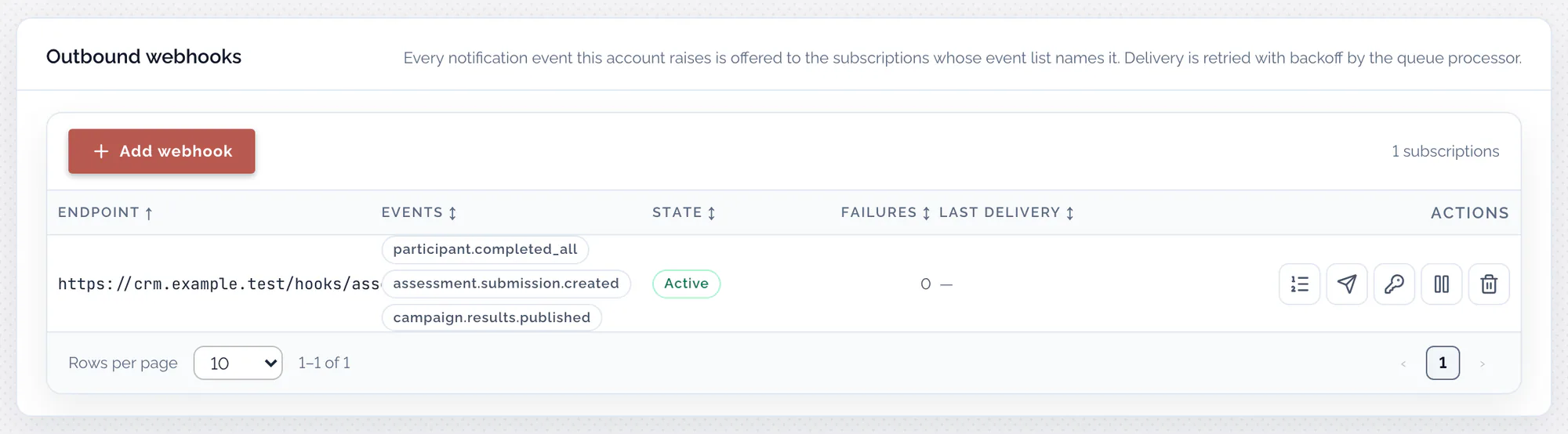
To check the connection, send a test. It raises a real webhook.test event through
the same queue every other event uses. It only reaches subscriptions that include
webhook.test (under Diagnostics in the event list); for any other, the page says
nothing was queued.
To see what was sent, open the subscription's deliveries: one row per delivery,
showing Event, Status (pending, delivered or failed), Attempts,
Last error (why the last attempt failed), Next attempt, Queued and
Event id. The message
bodies are not shown, because they can carry participant data. Load older
deliveries pages back through older ones.
A delivery succeeds when your endpoint answers with any 2xx status. Anything else is
retried, up to three attempts in all, at least one and then two minutes apart. After
the third failure the delivery is marked failed, and the subscription's Failures
count goes up by one. Re-fire on a failed delivery sends it again with the same
delivery ID, so a receiver that saw the earlier attempts recognises it.
The list's Last delivery column shows the last successful delivery.
Change a webhook
- Pausing and resuming: a paused subscription shows Paused under State. New events are not queued for it while it is paused, and anything already waiting is marked failed at the next send. Events that happen while it is paused are not sent later.
- Rotating the signing secret: Assessor.io generates a new secret and shows it once, under New signing secret; copy it, then choose I have copied it. From the next delivery on, including any already waiting, deliveries are signed with the new secret. Give it to your endpoint straight away, and let the endpoint accept the old one as well for a while, until no delivery signed with it can still arrive. The subscription and its queue are kept.
- Changing the address or the events: these cannot be edited. Delete the subscription and add a new one.
- Deleting: you are asked to confirm (Delete this webhook?). The endpoint stops receiving events immediately, and the subscription's delivery history goes with it.
Limits and gotchas
- An event that is not in the list never fires. If a subscription made through the API names an event the account cannot raise, the Events column marks it (never fires).
- Paused means lost, not delayed. Resume a subscription before the events you need, not after.
- The Failures count never resets. It counts deliveries that used up every attempt since the subscription was created.
Related pages
- Public API (v2): the headers, the body, verifying signatures and the full event catalogue.
- Make your first API call
- Message templates and the delivery log
- Account administrator home